Stock management in Excel or software? An honest comparison.
A spreadsheet is a fine place to start. This page explains where it works well, where it begins to hurt and how to move your list across without starting from zero.
- ✔ Where Excel works
- ✔ Where it breaks
- ✔ Cost of mistakes
- ✔ When to switch
- ✔ Move your sheet
- ✔ Keep Excel for reports
Excel is a good start
Most shops begin with a spreadsheet, and there is nothing wrong with that. It costs nothing, everyone knows how to open it and you can set up columns the way you like. For a business with a few dozen items, one person entering stock and no need to bill from the same file, Excel can do the job for a long time.
The trouble starts as the shop grows. The sheet becomes the place where every part of the business meets, and a spreadsheet was not built to be that.
Where a spreadsheet starts to hurt
The first problem is that stock only changes when somebody types. A sale made at the counter is not in the sheet until someone remembers to subtract it. Two people editing two copies will quickly create two different truths. A single mistyped number or a deleted row can go unnoticed for weeks.
The second problem is that a spreadsheet does not connect to anything. It does not make the invoice, it does not know a customer returned an item and it does not tell you when something is low. Each of those jobs becomes another sheet and another chore.
What software changes
In stock software the movement is a by-product of the work. When you bill an order, the quantity goes down. When a purchase is received, it goes up. A credit note puts a returned item back. The report for low stock, stock value, daily movement or expiry is a click, not a formula.
Effy Order also keeps the history. You can open an item and see every order and purchase order that touched it, which makes it far easier to find out why a count is off. Barcode scanning cuts down typing errors at the counter and during a stock check.
Moving from Excel without starting over
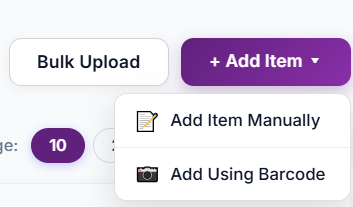
You do not need to type your catalogue again. Clean the sheet first: one row per product, one name per product and a unique SKU for each. Then bulk upload the items from Excel and bulk set the opening stock from Excel after a real count.
Run both for a week if that makes you comfortable. Bill in the software and compare its stock with your sheet at the end of each day. Once the two agree, retire the sheet for stock. Excel stays useful for what it does well, such as looking at a downloaded report in your own way.
The hidden cost of a spreadsheet
The real cost of a spreadsheet is rarely the file. It is the hour spent each evening copying the day’s sales into it, the argument about which copy is the latest, and the sale lost because an item showed as in stock when it was not. Add the time spent preparing month-end figures by hand, and a low monthly price for software often turns out to be cheaper than the free sheet. Count your own hours for a typical week before you decide.
Which one fits your shop
Use these signs to decide whether to stay on Excel or move on.
- Stay on Excel if you have few items and one person updates stock.
- Move to software if several people bill, or you sell all day.
- Move if you keep finding stock that does not match the shelf.
- Move if you also need invoices, dues and reports.
Frequently asked questions
Is Excel good enough for stock management?
For a very small shop with few items and one person entering data, yes. As billing volume and the number of people grow, stock software saves time and avoids mistakes.
Can I import my Excel stock list into Effy Order?
Yes. You can bulk upload items from Excel and bulk update or set stock quantities from Excel.
Can I still use Excel after moving?
Yes. Reports are downloadable, so you can open them in Excel and sort or filter them as you like.
How long does it take to switch?
It depends on how clean your sheet is. Cleaning the list takes the longest. The upload itself is quick, and a week of side-by-side checking gives you confidence.
Start billing smarter today
Plans starting at ₹199/mo with a 30-day free trial. No hidden fees — upgrade anytime as you grow.