Barcode billing software for a faster counter.
Scan, bill, done. Add items by scanning their barcode, check out on a POS-style screen, and let stock update itself.
- ✔ Scan to bill
- ✔ POS billing screen
- ✔ Barcode generator
- ✔ Barcode label printing
- ✔ Camera scanning
- ✔ Live stock updates
Why barcodes speed up the counter
Typing item names at a busy counter is slow and invites mistakes. A barcode scan finds exactly the right item and adds it with its price in a moment. Scanning also keeps stock honest, because the item sold is the item removed from stock.
Effy Order supports a barcode scanner as well as the camera on a phone or tablet, so a small shop can start scanning without buying new hardware.
Products without a barcode
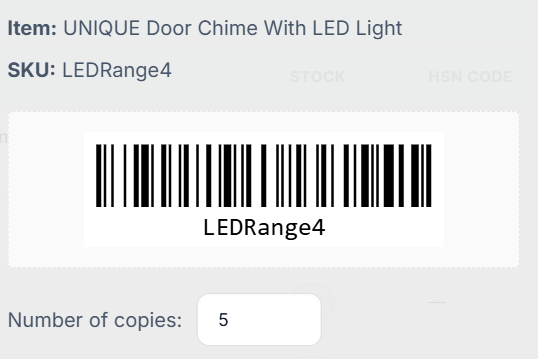
Not every product arrives with a printed barcode. For loose items, local brands and things you pack yourself, Effy Order has a barcode generator and lets you print labels for your shelves. Once labelled, those items are scanned like any other.
You can add new items by scanning their barcode, and you can change the count of an item by scanning it in express quantity update, which is a quick way to do a stock check along a shelf.
Setting up the counter
A scanner that behaves like a keyboard, and sends an Enter key after each scan, works well with the billing screen. In the full billing form and in sale order editing, a scanned code adds the item or increases its quantity if it is already on the bill.
Choose the POS billing look for a supermarket-style checkout, or express mode for a tablet. Voice search is also there for finding items by name. After each bill, stock and reports update by themselves.
Scan items straight into the bill
Use a barcode scanner or the device camera. Items are found instantly and added with their price.
- Barcode scanner and camera scanning supported.
- POS billing look for supermarket-style checkout.
- Express mode built for phones and tablets.
- Voice search to find items by name.
Generate and print your own barcodes
No barcode on a product? Create one and print labels in bulk.
- Barcode generator for your items.
- Print barcode labels for your shelves.
- Add new items by scanning their barcode.
- Update stock by scanning with express quantity update.
Start with what you already have
You do not need an expensive POS machine to begin scanning.
- A USB or Bluetooth barcode scanner that works as a keyboard.
- The camera on a phone or tablet.
- A normal printer or a roll printer for labels and bills.
- Any modern browser on the device you already use.
Frequently asked questions
Can I bill using a barcode scanner?
Yes. Scan an item’s barcode in the billing screen and it is added to the bill automatically. You can also scan with your phone or tablet camera.
Can I print barcodes for my products?
Yes. Effy Order has a barcode generator and lets you print barcode labels for your items.
Does it work on a tablet or phone at the counter?
Yes. Express billing mode is designed for touch screens, with large buttons and camera scanning.
What kind of barcode scanner works with Effy Order?
A scanner that types the code like a keyboard and sends an Enter key after each scan works with the billing screen. Phone and tablet cameras can also scan.
What happens if I scan an item that is already on the bill?
The quantity of that item goes up by one instead of adding a second line.
Can I do a stock check by scanning?
Yes. Express quantity update lets you scan an item and change its count.
Start billing smarter today
Plans starting at ₹199/mo with a 30-day free trial. No hidden fees — upgrade anytime as you grow.