Preparing for GSTR-1 using your own sales reports.
GSTR-1 lists the sales you made in a period. If your billing software keeps tidy records, most of the preparation is gathering and checking reports. Here is how to do that calmly.
- ✔ What GSTR-1 covers
- ✔ Reports to collect
- ✔ Checks before filing
- ✔ Returns and credit notes
- ✔ Share with accountant
- ✔ Not tax advice
What GSTR-1 is, in plain words
GSTR-1 is the GST return in which a registered business reports the sales it made in a period. It is about outward supplies: who you sold to, what you sold and how much tax was charged. Another return, which your accountant handles, deals with tax payment. How often you file, and in what form, depends on your turnover and your registration, so confirm it with your accountant before each filing.
This page does not explain how to file and it is not tax advice. It explains what information to have ready, and how a sales report from billing software can help you collect it in less time.
What to collect before filing
For a period such as a month, gather the details of every bill you made: the invoice number and date, the customer, the items with their HSN codes, the value, the discount, the tax rate and the CGST, SGST or IGST charged. Add the credit notes you issued for returns or overcharges in the same period, because they reduce the sales.
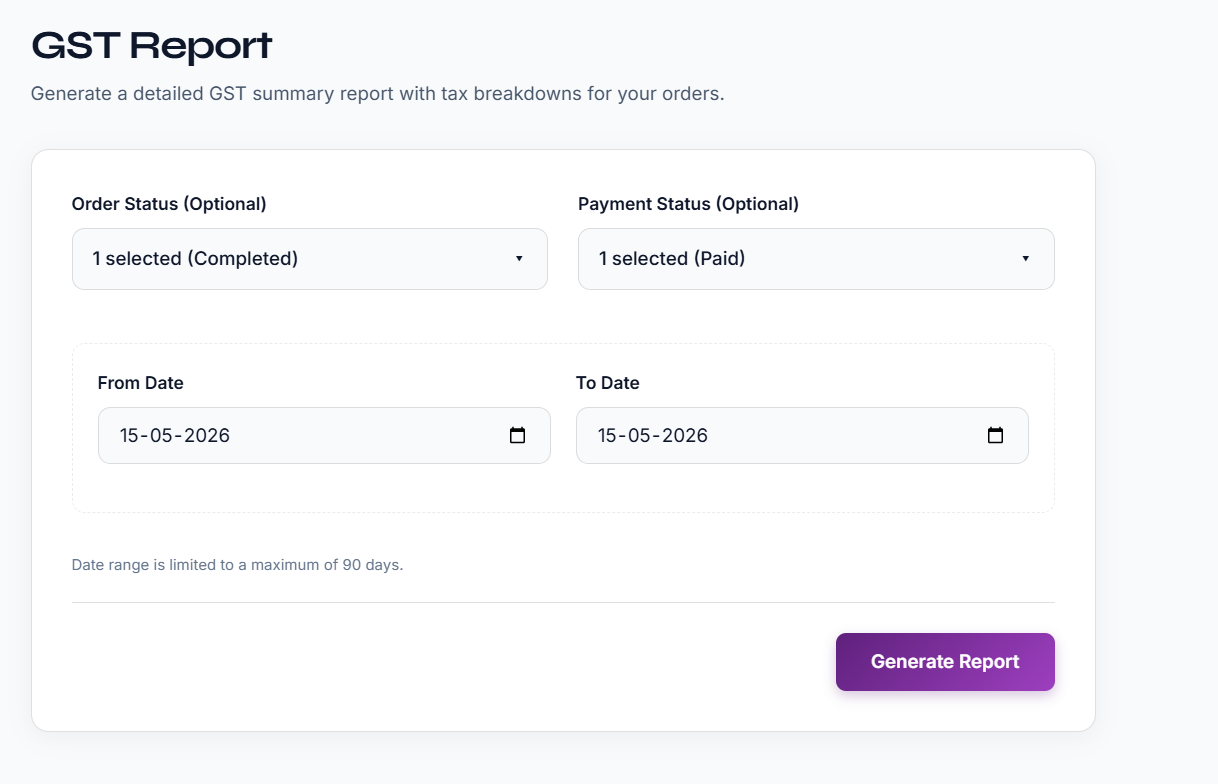
In Effy Order, the GST report gives a summary of your orders with a tax breakdown for the dates you choose, and the sales report lists the orders themselves, with filters for order status and payment status. Download both for the same dates and keep them together.
Checks that catch most mistakes
Compare the total sales in the sales report with the total in the GST report for the same period. If the two differ, look at the filters, because a status filter on one and not on the other is the most common reason. Check that rejected or cancelled orders are handled as you and your accountant expect.
Check a few bills by hand. Pick a bill with a discount, a bill to another state and a bill with a delivery charge, and confirm that the tax shown is what you expect. Match the number of bills with your invoice series to be sure none is missing. Also look at the credit notes for the period.
Limits to keep in mind
Effy Order reports are summaries to help you and your accountant. The GST report covers up to 90 days at a time, so for a quarter you download it in parts. The report is a working file, and your accountant decides how the figures go into the return.
Return formats and rules change from time to time. If your accountant needs the data laid out in a particular way, ask them for the format early, so that you can check whether the downloaded report fits or whether they will reshape it.
When to start collecting
Do not wait for the due date. Download the sales report every week, even if you only glance at it. A small mistake found on the third day of the month, such as a bill with the wrong state, is easy to fix. The same mistake found on the last day before filing is stressful. Ask your accountant which date they need the files by, and work backwards from it so that the checks above happen in a calm week and not in a rush.
A simple routine that saves a day
Do the same steps every month so that nothing is left to the last date.
- Download the sales report and the GST report for the month.
- Compare the totals and look for filter differences.
- Check credit notes and returns of the month.
- Send both files to your accountant with a short note.
Frequently asked questions
What is GSTR-1?
GSTR-1 is the GST return that reports the sales a registered business made in a period. Your accountant can tell you how often it must be filed for your business.
Can I file GSTR-1 directly from Effy Order?
Effy Order gives you the sales and GST reports as downloadable files. It does not file returns for you, so use the reports to prepare and share the data with your accountant.
Why is my sales total different from my GST report total?
Check the filters used for each report, such as order status, payment status and dates. Different filters give different totals.
How long a period can the GST report cover?
Up to 90 days at a time. For a longer period, download it in parts.
Is this page legal or tax advice?
No. It is general information. Confirm the rules and the format needed for your business with your accountant.
Start billing smarter today
Plans starting at ₹199/mo with a 30-day free trial. No hidden fees — upgrade anytime as you grow.